
Linux C语言(一) 简单的文件操作
linux驱动学习(一) 简单文件操作
简单的文件IO读写示例
代码贴上,程序代码一目了然。
#include <sys/types.h>
#include <sys/stat.h>
#include <fcntl.h>
#include <unistd.h>
#include <stdio.h>
int main(void)
{
 char buffer[1024];
 int fd1, fd2;
 int ret;

 /* 打开 src_file 文件 */
 fd1 = open("./src_file", O_RDONLY);

 if (-1 == fd1) {
    printf("Error: open src_file failed!\n");
    return -1;
 }

 /* 新建 dest_file 文件并打开 */
 fd2 = open("./dest_file", O_WRONLY | O_CREAT | O_EXCL,
 S_IRWXU | S_IRGRP | S_IROTH);

 if (-1 == fd2) {
    printf("Error: open dest_file failed!\n");
    ret = -1;
    goto err1;
 }

 /* 将 src_file 文件读写位置移动到偏移文件头 500 个字节处 */
 ret = lseek(fd1, 500, SEEK_SET);

 if (-1 == ret)
 goto err2;

 /* 读取 src_file 文件数据,大小 1KByte */
 ret = read(fd1, buffer, sizeof(buffer));

 if (-1 == ret) {
    printf("Error: read src_file filed!\n");
    goto err2;
 }

 /* 将 dest_file 文件读写位置移动到文件头 */
 ret = lseek(fd2, 0, SEEK_SET);

 if (-1 == ret)
   goto err2;

 /* 将 buffer 中的数据写入 dest_file 文件,大小 1KByte */
 ret = write(fd2, buffer, sizeof(buffer));

 if (-1 == ret) {
    printf("Error: write dest_file failed!\n");
    goto err2;
 }

 printf("OK: test successful\n");
 ret = 0;

err2:
  close(fd2);
err1:
  close(fd1);
  return ret;
}
在Linux中,一切皆为文件,根据文件类型及意义,可以分为以下几种:
普通文件设备文件:代表一个具体的硬件设备管道文件、FIFO文件:具有特殊意义的文件,用于进程间通信;套接字文件:用于网络通信;
而所有所有的文件,都可以用文件读写的方式进行操作,即打开文件open、读取文件read、写文件write、关闭文件close,这也是linux在进行文件读写、设别操作、通信、网络等等的4条API。在使用open()读取文件后,会返回一个文件的描述字fd,fd为一个int型整形变量,若正常open文件,fd将是一个非负整数,若返回-1,则代表打开失败,每一个文件在同一个进程中都拥有唯一的描述字,一个进程中打开的文件数量也是有限的,一般为1024,但是可以进行修改。
文件关闭后,相应的fd描述字也得到了释放,那么这个文件描述符将可以再次分配给其它打开的文件、与对应的文件绑定起来。
open( )
   int open(const char *pathname, int flags, ...
              /* mode_t mode */ );
The argument flags must include one of the following access
modes: O_RDONLY , O_WRONLY, or O_RDWR. These request opening the
file read-only, write-only, or read/write, respectively.
一int open(const char *pathname, int flags);
open( )的参数 flags可为读取文件的模式 :即
O_RDONLYread only 只读O_WRONLYwrite only 只写O_RDWRread write 读写O_CREAT如果 pathname 参数指向的文件不存在则创建此文件
我们传入 flags 参数时既可以单独使用某一个标志,也可以通过位或运算(|)将多个标志进行组合。
open( )示例
open("./src_file", O_RDONLY) //单独使用某一个标志
open("./src_file", O_RDONLY | O_NOFOLLOW) //多个标志组合
当我们使用O_CREAT作为flag时,若pathname指向的文件不存在,将会创建此文件,在创建文件时,也需要指定该文件的权限,那么,我们将会用到下面这个函数 :
int open(const char *pathname, int flags, mode_t mode);
linux的文件权限管理自行百度。
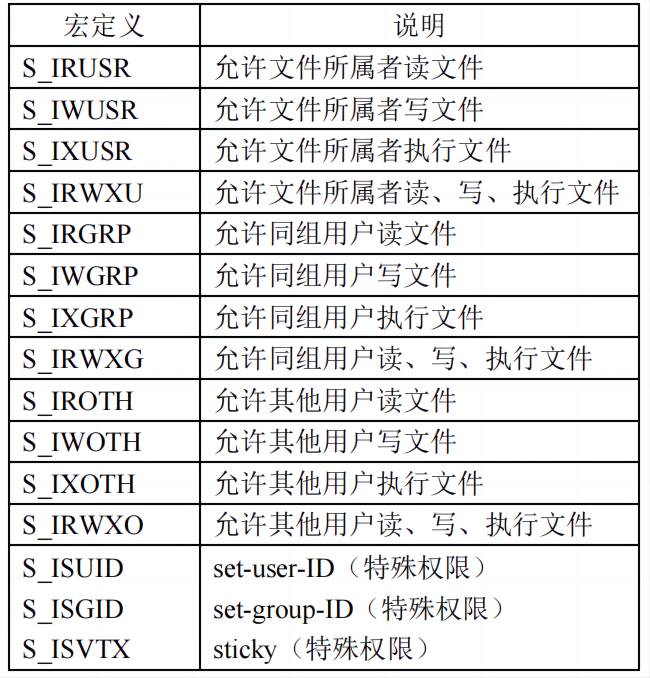
这些宏既可以单独使用,也可以通过位或运算将多个宏组合在一起,譬如:
S_IRUSR | S_IWUSR | S_IROTH
int fd = open("/home/dengtao/hello", O_RDWR | O_CREAT, S_IRWXU | S_IRGRP | S_IROTH);
if (-1 == fd)
  return fd;
附上man手册的连接 https://www.man7.org/linux/man-pages/man2/open.2.html
write( )
write - write to a file descriptor 写文件,传入文件的描述字
ssize_t write(int fd, const void buf[.count], size_t count);
fd :文件描述符。关于文件描述符,前面已经给大家进行了简单地讲解,这里不再重述!我们需要将进
行写操作的文件所对应的文件描述符传递给 write 函数。
buf :指定写入数据对应的缓冲区。
count :指定写入的字节数。
返回值:如果成功将返回写入的字节数(0 表示未写入任何字节),如果此数字小于 count 参数,这不是错误,譬如磁盘空间已满,可能会发生这种情况;如果写入出错,则返回-1。
read( )
ssize_t read(int fd, void *buf, size_t count);
fd :文件描述符。与 write 函数的 fd 参数意义相同。
buf :指定用于存储读取数据的缓冲区。
count :指定需要读取的字节数。
返回值 :如果读取成功将返回读取到的字节数
close
关闭呗,传入要关闭的描述符。
lseek( )
lseek - reposition read/write file offset
off_t lseek(int fd, off_t offset, int whence);
参数whence为偏移量offset的参考值,值为如下宏:
EEK_SET将读写位置指向文件头后再增加offset个位移量。SEEK_CUR以目前的读写位置往后增加offset个位移量。SEEK_END将读写位置指向文件尾后再增加offset个位移量。
(通俗来讲,lseek就是移动光标,移动读写位置)
 简单的文件操作&pics=/upload/snowflake-purple.png&summary=)
 简单的文件操作&pics=/upload/snowflake-purple.png&desc=)